---
title: How to check-in couples/relatives?
description: In the Lento Arrivals platform, it is visible if two expected arrivals are a couple.
---

[Skip to content](https://faq.lento.eu/en/how-to-check-in-couples/relatives#main-content)

English

Show submenu for translations

![230825\_Lento.eu\_Logo.svg\]](https://faq.lento.eu/hubfs/230825_Lento.eu_Logo.svg)

Open main navigation

Close main navigation

- English
  
  Show submenu for translations
- [Back to Lento.eu](https://lento.eu/en)

[Back to Lento.eu](https://lento.eu/en)

 How may we help you?

- There are no suggestions because the search field is empty.

1. [Frequently asked questions](https://faq.lento.eu/en?hsLang=en)
2. [Questions about renting](https://faq.lento.eu/en/questions-about-renting?hsLang=en)
3. [My Booking](https://faq.lento.eu/en/questions-about-renting?hsLang=en#my-booking)

# How to check-in couples/relatives?

In the Lento Arrivals platform, it is visible if two expected arrivals are a couple. This shows that these two people want to be placed together in a room. 

It also clearly indicates the exact relationship between the two people:

- Relatives
- Couple
- Friends
- Married


**How does it work?**

 **1. Check-in**

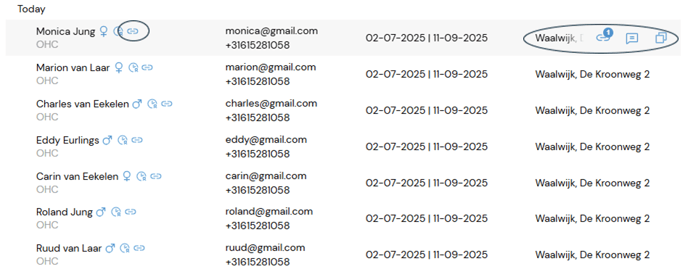
Check the arrivals-list on Lento; Next to the name of the expected arrival and after the location-name you see a ‘couple-icon’.

When you select the arrival, you see a blue dot with a number. This means the tenant is part of 1 couple/relation. Note that tenants can be part of more than one couple!
![check in](https://faq.lento.eu/hs-fs/hubfs/Knowledge%20Base%20Import/check%20in.png?width=688&height=277&name=check%20in.png)

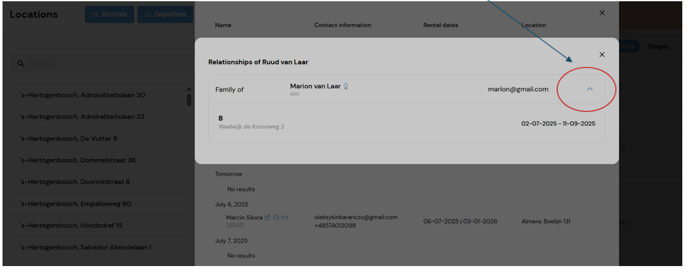
If you click on this icon, a pop-up screen appears and shows:

- which tenant the person is related to
- what kind of relationship this is
- if you click on ^ (see screenshot) you can see the room where the relation is in
![beeld 2](https://faq.lento.eu/hs-fs/hubfs/Knowledge%20Base%20Import/beeld%202.png?width=688&height=274&name=beeld%202.png)

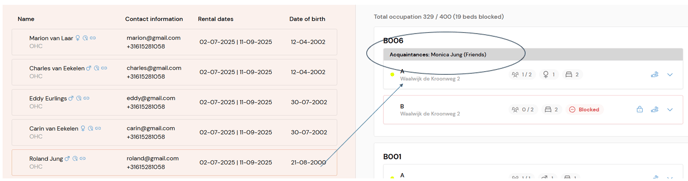
I check her in and when I select her relative to check him in as well, I see on the right sight of the screen a pre-defined room (the room in which the relative is already checked-in):
![3](https://faq.lento.eu/hs-fs/hubfs/Knowledge%20Base%20Import/3.png?width=688&height=181&name=3.png)

Check the second person in, and you see the relationship between them on the right side of your screen in the room.

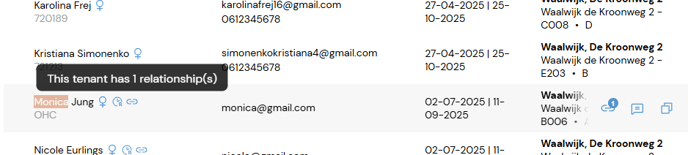
After check-in, you can also see the relation in the night register as well in the pop-up as in the download version:

Download, in the last column:

![night rgister](https://faq.lento.eu/hs-fs/hubfs/Knowledge%20Base%20Import/night%20rgister.png?width=688&height=53&name=night%20rgister.png)

 Popup: hoover over the name with cursor and you see the couple-icon:
![Popup](https://faq.lento.eu/hs-fs/hubfs/Knowledge%20Base%20Import/Popup.png?width=688&height=155&name=Popup.png)

**2. Move or Swap a couple**

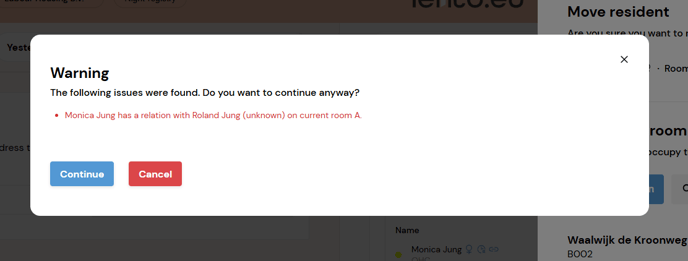
It is possible to move a couple to another room or location. You will get a pop-up screen with the message that this is a person who is part of a couple.
![Swap](https://faq.lento.eu/hs-fs/hubfs/Knowledge%20Base%20Import/Swap.png?width=688&height=261&name=Swap.png)


- [Questions about renting](https://faq.lento.eu/en/questions-about-renting?hsLang=en#main-content)

    - [My Registration](https://faq.lento.eu/en/questions-about-renting?hsLang=en#my-registration)
    - [My Booking](https://faq.lento.eu/en/questions-about-renting?hsLang=en#my-booking)
    - [My Home](https://faq.lento.eu/en/questions-about-renting?hsLang=en#my-home)
    - [My Payments](https://faq.lento.eu/en/questions-about-renting?hsLang=en#my-payments)
    - [My Rent](https://faq.lento.eu/en/questions-about-renting?hsLang=en#my-rent)
    - [My Contract](https://faq.lento.eu/en/questions-about-renting?hsLang=en#my-contract)
- [Questions about renting out](https://faq.lento.eu/en/questions-about-renting-out?hsLang=en#main-content)

    - [My Account](https://faq.lento.eu/en/questions-about-renting-out?hsLang=en#my-account)
    - [Rent out](https://faq.lento.eu/en/questions-about-renting-out?hsLang=en#rent-out)
    - [Arrivals platform](https://faq.lento.eu/en/questions-about-renting-out?hsLang=en#arrivals-platform)

[![230825\_Lento.eu\_Logo 1](https://faq.lento.eu/hs-fs/hubfs/230825_Lento.eu_Logo%201.png?width=200&height=58&name=230825_Lento.eu_Logo%201.png "230825_Lento.eu_Logo 1")](http://lento.eu/)

<https://www.facebook.com/> <https://www.twitter.com/> <https://www.instagram.com/> <https://podcasts.apple.com/> [mailto:email@email.com](mailto:email@email.com)

Copyright © 2026, Lento.eu - Easy living